Technical SEO Guide
Advanced optimization strategies to improve crawlability, indexability, and performance
Table of Contents
Crawling & Indexing
Search engines need to crawl and index your pages before they can rank in search results. Optimizing these processes is fundamental to technical SEO success.
Robots.txt Configuration
The robots.txt file tells search engine crawlers which parts of your site they can access. Proper configuration is essential for efficient crawling and resource management.
User-agent: *
Disallow: /admin/
Disallow: /private/
Disallow: /temp/
Allow: /

User-agent: Googlebot
Allow: /

Sitemap: https://yourdomain.com/sitemap.xml
Best Practices
- Keep your robots.txt file in the root directory
- Block admin areas, cart processes, and duplicate filter pages
- Don't use robots.txt to hide pages from search results (use noindex instead)
- Include links to your sitemap files
- Regularly check for crawl errors in Google Search Console
Advanced Indexing Optimization
Beyond basic configurations, these strategies can help optimize crawling and indexing:
- Crawl budget optimization - Prioritize important pages and minimize crawling of lower-value URLs
- Log file analysis - Examine server logs to understand how search engines crawl your site
- Faceted navigation management - Implement proper handling of filter parameters to avoid duplicate content
- Pagination optimization - Use crawlable pagination links and distinct page URLs. Google does not use rel="next" or rel="prev" as pagination indexing signals.
Site Speed & Core Web Vitals
Core Web Vitals measure aspects of real user experience and are used by Google’s ranking systems. Good scores do not guarantee rankings; useful content and the broader page experience remain important.
Largest Contentful Paint (LCP)
Measures loading performance - how quickly the main content loads.
First Input Delay (FID)
Measures interactivity - how quickly the page responds to user interactions.
Cumulative Layout Shift (CLS)
Measures visual stability - how much elements move during page load.
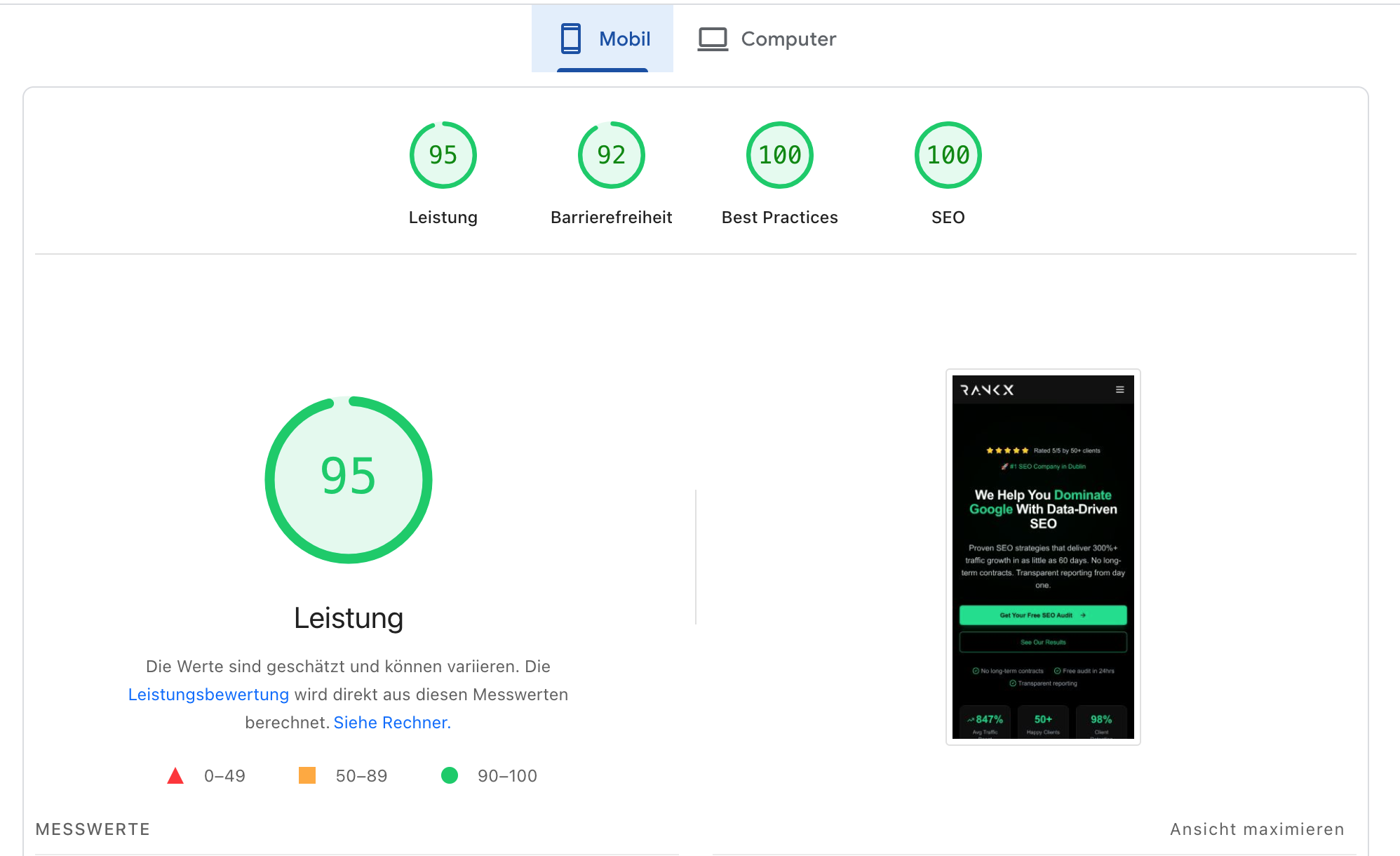
RankX Core Web Vitals Results
Our own website scores — proof that we practice what we preach.
Speed Optimization Techniques
Image Optimization
- Use modern formats like WebP and AVIF
- Implement responsive images with srcset attribute
- Lazy-load images below the fold
- Properly size images for their display dimensions
- Use CDN for image delivery
JavaScript Optimization
- Minimize and bundle JavaScript files
- Remove unused JavaScript code
- Defer non-critical JavaScript
- Use async loading for third-party scripts
- Implement code splitting for JavaScript frameworks
Server Optimization
- Enable HTTP/2 or HTTP/3
- Implement server-side caching
- Use content delivery networks (CDNs)
- Enable GZIP or Brotli compression
- Optimize Time to First Byte (TTFB)
Core Web Vitals Audit Process
- 1
Measurement
Use Chrome User Experience Report data in Google Search Console, PageSpeed Insights, and Lighthouse to measure Core Web Vitals
- 2
Prioritization
Focus on high-traffic pages and templates first, prioritizing issues based on impact
- 3
Implementation
Apply fixes to highest-impact issues first, especially those affecting LCP
- 4
Monitoring
Implement continuous monitoring to track improvements and catch regressions
Structured Data Implementation
Structured data helps search engines understand the content and context of your pages, enabling rich results in search.
This section contains comprehensive guidance on schema markup implementation, JSON-LD best practices, and strategies for different content types...
JavaScript SEO
Modern websites use JavaScript frameworks, which present unique SEO challenges. Proper implementation ensures your JS content is discoverable and indexable.
This section addresses JavaScript rendering, server-side rendering vs. client-side rendering, dynamic content indexing, and SPA optimization...
Mobile Optimization
With mobile-first indexing, optimizing for mobile devices is no longer optional but essential for SEO success.
This section covers responsive design, mobile-specific issues, mobile page speed optimization, and mobile UX considerations for SEO...
Site Architecture & URL Structure
A logical site structure helps search engines crawl efficiently and understand content relationships, while user-friendly URLs enhance user experience and CTR.
This section explores information architecture principles, URL best practices, internal linking strategies, and taxonomy optimization...
Essential Technical SEO Tools
Crawling & Auditing
- Screaming Frog SEO Spider
- DeepCrawl
- Sitebulb
Performance Testing
- Google PageSpeed Insights
- Lighthouse
- WebPageTest
Structured Data Testing
- Schema Markup Validator
- Google Rich Results Test
- Structured Data Testing Tool
Monitoring & Analytics
- Google Search Console
- Bing Webmaster Tools
- Log file analyzers
Need Help With Technical SEO?
Our experts can conduct a comprehensive technical audit and implement advanced optimizations
Book a strategy callAdditional Resources
Structured Data Examples
Ready-to-use JSON-LD code snippets for common content types
Explore supported markupCore Web Vitals Checklist
Complete optimization checklist for improving Core Web Vitals
Read the vitals guidanceFrequently Asked Questions
Which technical SEO issues have the biggest impact on rankings?
The most impactful technical SEO issues are typically those affecting crawlability, indexability, and page experience. Specifically, issues that prevent search engines from accessing your content (like server errors, robots.txt blocks, or render-blocking resources) can severely limit your ability to rank. Core Web Vitals can contribute to page experience, but the ranking effect varies; prioritise performance problems that affect real users without promising ranking gains. Additionally, improper handling of duplicate content, incorrect implementation of hreflang tags for international sites, and poor mobile optimization can all substantially impact your search performance.
How often should I conduct a technical SEO audit?
For most websites, a comprehensive technical SEO audit should be conducted quarterly (every 3 months). However, this frequency may vary based on your website's size, complexity, and rate of change. Large e-commerce sites or websites undergoing frequent updates may benefit from monthly mini-audits focused on critical technical aspects. Additionally, you should perform targeted technical audits after any major website changes, platform migrations, or redesigns. Continuous monitoring of technical performance metrics using tools like Google Search Console, server logs, and performance monitoring platforms can help identify issues between formal audits.
Is JavaScript bad for SEO?
JavaScript itself isn't inherently bad for SEO, but improper implementation can create significant challenges for search engines. Modern search engines can render and index JavaScript content, but the process is more resource-intensive and less reliable than HTML. Common issues include increased crawl budget consumption, delayed indexing, and potential rendering failures. To optimize JavaScript-heavy sites for SEO, consider implementing server-side rendering (SSR) or pre-rendering for critical content, keeping content equivalent for users and crawlers, minimizing unnecessary JavaScript, and ensuring your site functions properly without JavaScript enabled (progressive enhancement). It's also crucial to test how search engines see your JavaScript content using tools like URL Inspection in Google Search Console.
How do I optimize for Core Web Vitals?
To optimize for Core Web Vitals, focus on specific improvements for each metric. For Largest Contentful Paint (LCP), prioritize server response times, eliminate render-blocking resources, optimize and preload critical assets, and implement proper image optimization techniques. For Cumulative Layout Shift (CLS), always specify image dimensions, reserve space for ads and embeds, avoid inserting content above existing content, and use transform animations instead of animations that trigger layout changes. For Interaction to Next Paint (INP), minimize or defer JavaScript, break up long tasks, optimize event handlers, and remove unused JavaScript. Use field data from real users via Chrome User Experience Report (in Google Search Console) to identify problems, then lab tools like Lighthouse to diagnose and fix specific issues.